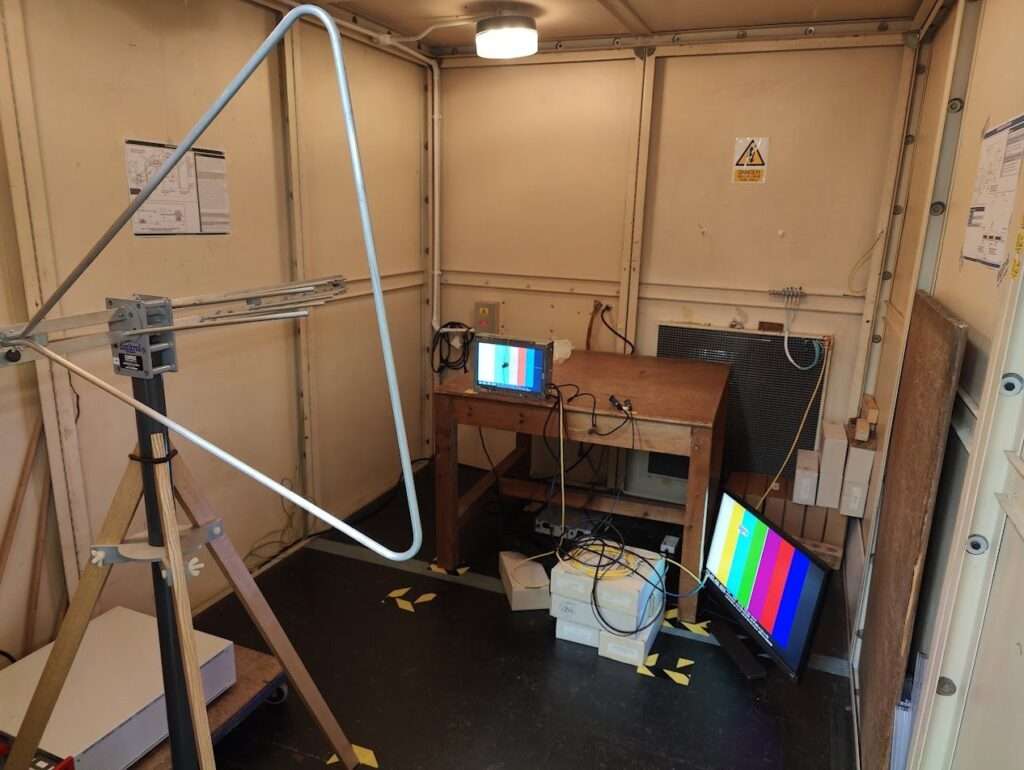
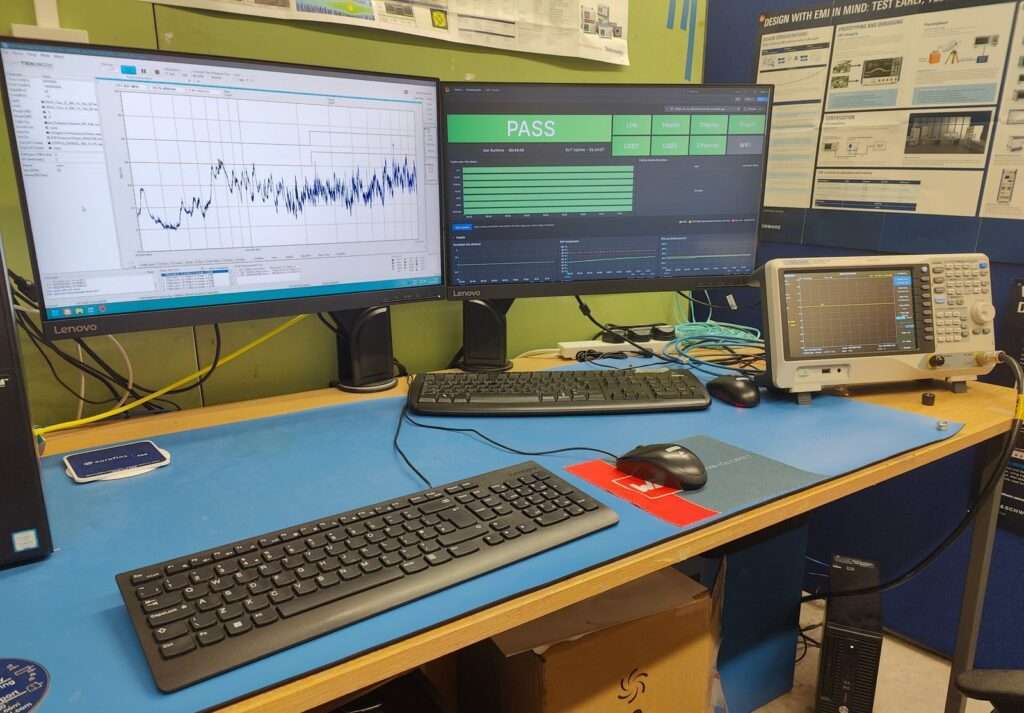
An EMC test is only as good as your ability to exercise and monitor your equipment under test (EUT). If an interface drops out for a few seconds and nobody notices, the report says pass and the customer finds the problem in the field. And staring at a screen for hours, waiting for something not to happen, is nobody’s idea of a good day.
We’ve been working on a product built around a Raspberry Pi Compute Module 5, with a touchscreen, HDMI, USB, Ethernet and WiFi. With more than a little help from Claude Code, we built a system that keeps every one of those interfaces busy, and monitors them continuously, showing the test engineer outside the chamber pass or fail at a glance.
Standing on a good guide
The design is based heavily on EUT/DUT Software Requirements for EMC Testing by James Pawson of Unit 3 Compliance. It is the clearest statement we have found of what monitoring software for immunity testing actually needs to do. In short:
- Exercise every function in its worst-case state, continually, with no user input.
- Monitor remotely and fast enough to catch a fault well inside a typical 3 s dwell per frequency step.
- Hold minimum and maximum values and latch failures, so a one-second glitch is still visible when you look back.
- Make pass or fail obvious to a tired operator at a glance, with logs as a supplement rather than the main evidence.
What the test engineer sees
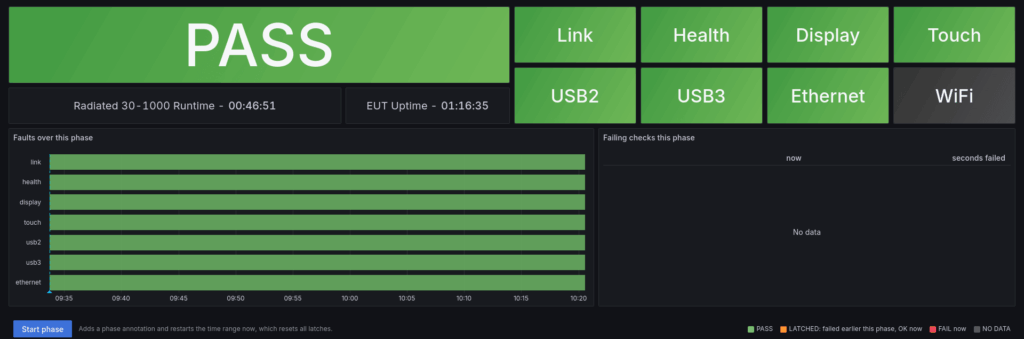
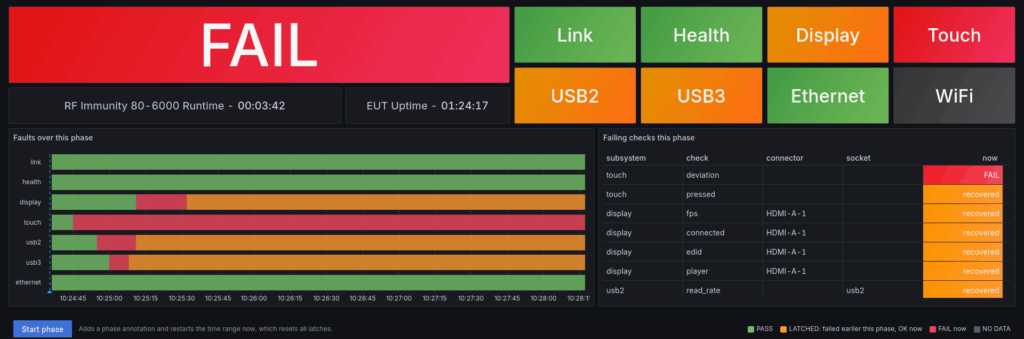
The top of the dashboard answers one question without scrolling: is the EUT still working? One large tile gives the overall state, with a tile per subsystem beside it. Green means no check has failed in this test phase, orange means something failed earlier and has recovered, red means failing now and grey means no data.
Failures latch until the operator presses Start phase, which also names the phase and marks it on every graph. A timeline shows when each subsystem was in trouble, and a table lists exactly which check failed, on which output, and for how many seconds. Latches only clear when a new phase starts.
How each interface is tested
Each interface has its own row on the dashboard, with fixed axes, red dashed fail limits and min, max and last values.
Health
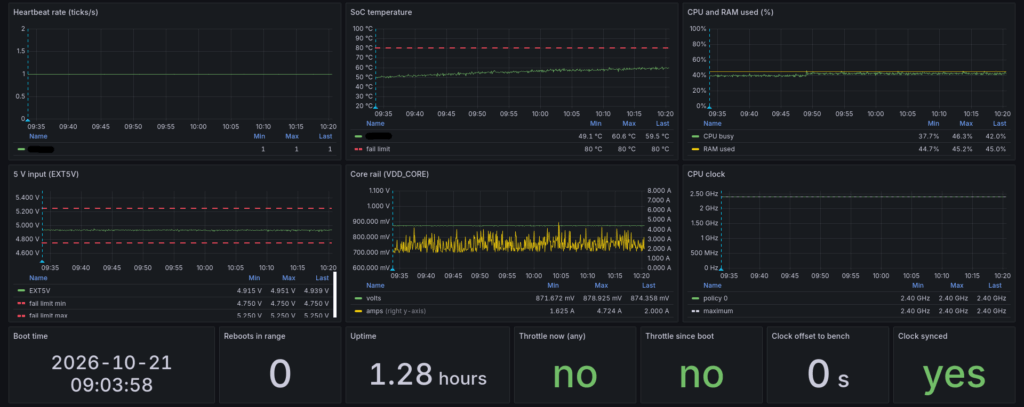
The EUT’s vital signs. A heartbeat ticks once a second, and a missed tick means the software has stopped. We also log SoC temperature, CPU and RAM load, CPU clock, and the 5 V input and core rail voltage and current from the module’s power management chip.
Fails on: missed heartbeat, reboot, 5 V input outside 4.75 to 5.25 V, SoC above 80 °C, any under-voltage or throttling flag.
Display
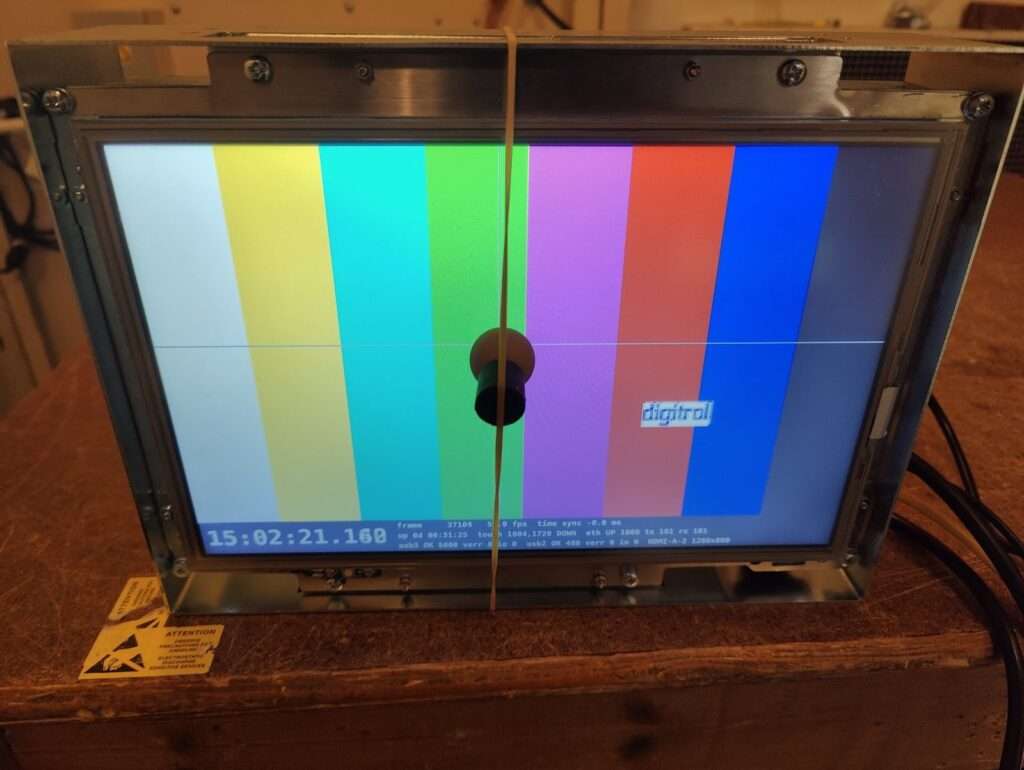
The built-in LCD and the HDMI output each show the EN 55032 Annex J colour bars, with the Digitrol logo bouncing around as the moving element (yes, like a DVD player screensaver). Each output runs at its monitor’s preferred resolution, up to 4K, or a fixed mode set for the test. A thin crosshair marks the current touch position.
A status strip along the bottom shows a millisecond clock, a frame counter and live readings from every interface. It is drawn by the EUT itself, so it keeps updating even if the Ethernet link is lost. The EUT’s clock is synchronised to the bench PC.
Screen recording of the display exercising, also showing the status strip at the bottom of the screen.
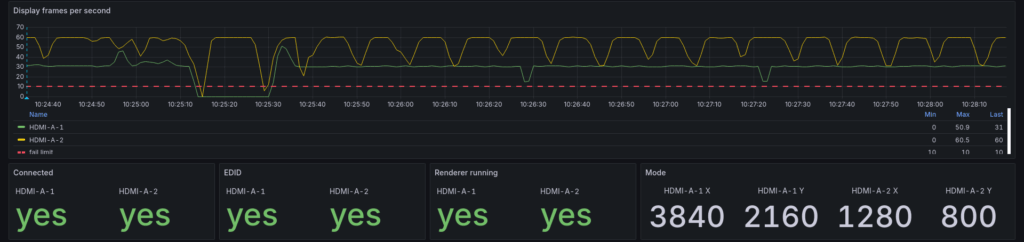
The software monitors each output’s connection, EDID, active mode, renderer and frame rate.
Fails on: disconnection, lost EDID, mode change, renderer stopped, under 10 fps.
Touch
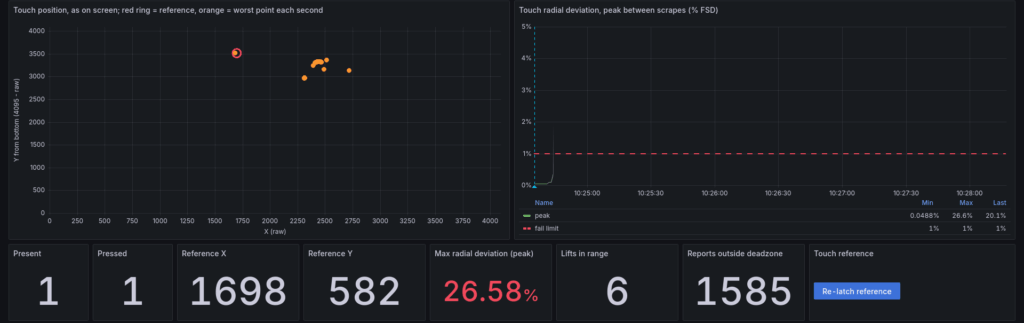
For radiated immunity, a rig holds a constant press on the resistive panel (more on that below). The software reads every event from the touch controller, so a momentary jump between readings is still caught. The first press sets a reference position, and every reading is compared with it.
Fails on: deviation over 1 % of full scale, any lift, panel not pressed.
The touch rig
A resistive panel needs a steady, repeatable press for hours at a time. Our high-precision solution is the ball from an old rollerball mouse, held against the middle of the screen by an elastic band around the enclosure.
State-of-the-art touch actuation. The grey line through the ball is the crosshair, which the EUT draws at the reported touch position.
USB 3.2 Gen 1 and USB 2.0
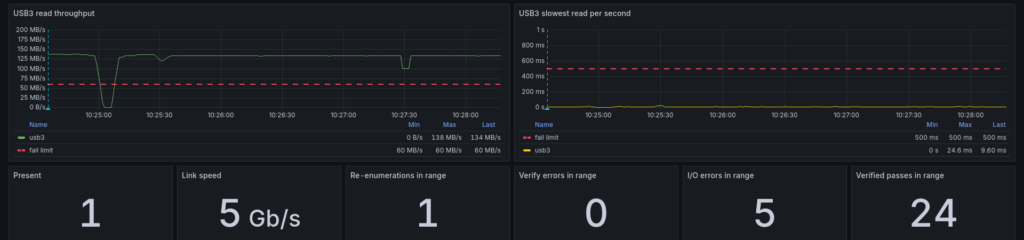
One memory stick in each socket is read flat out, at about 133 MB/s on USB 3.2 Gen 1 and 38 MB/s on USB 2.0. The first pass over a 1 GiB region records a checksum for every 1 MiB, and every later pass is verified against it. Reads are read-only and bypass the cache, so any stick works, nothing is written and the data really crosses the bus each time.
Fails on: stick missing, re-enumeration, USB 3 falling back to USB 2 speed, throughput under 60 MB/s (USB 3) or 10 MB/s (USB 2), any read taking over 0.5 s, any checksum or I/O error.
Ethernet
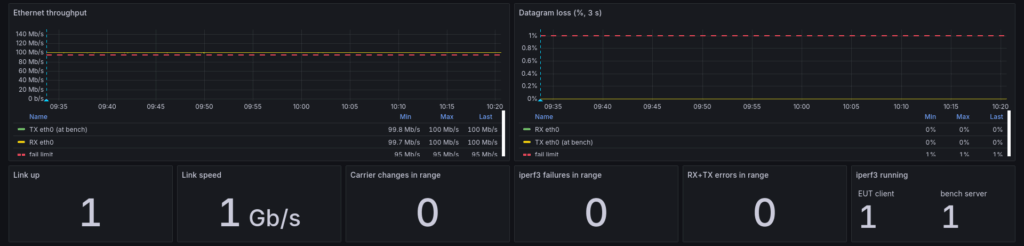
iperf3 sends UDP at 100 Mb/s in each direction at once between the EUT and the bench. Each end measures what it receives, so packet loss is counted directly in both directions.
Fails on: link down, speed below 1 Gb/s, under 95 Mb/s received either way, over 1 % packet loss, any carrier change or interface error.
WiFi
On the wireless variant, iperf3 runs UDP at 15 Mb/s each way through an access point. The software also logs signal strength, link rate, reconnects and access point changes. The signal floor is set on the day from the 20 to 30 dB link budget recommended in ETSI EN 301 489. When WiFi isn’t under test, the radios are switched off and the dashboard ignores WiFi.
Fails on: disconnection, reconnect or access point change, under 13.5 Mb/s, over 10 % loss, signal below the floor.
How it works
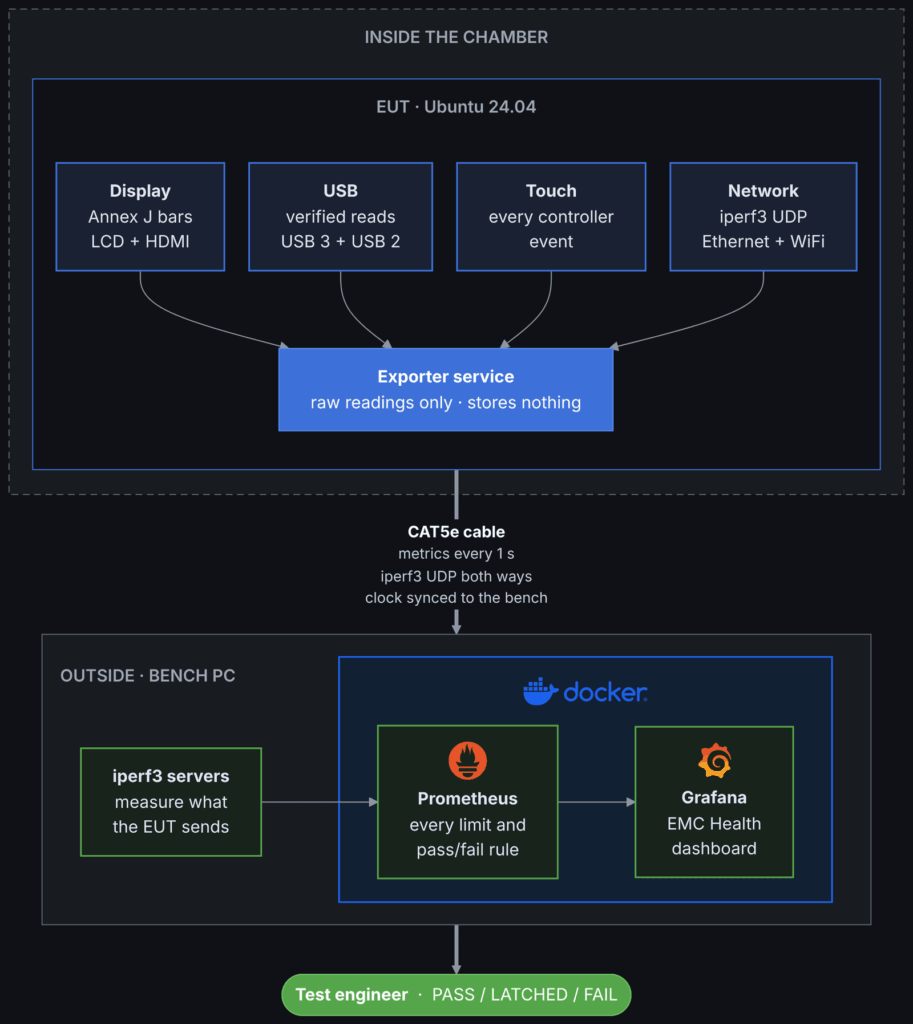
The whole system is built from free, open-source parts, and the EUT side is deliberately simple.
On the EUT, a single Python service starts at boot. It drives the exercisers and publishes raw readings over HTTP. It holds no limits and stores nothing, so there is nothing on the EUT to corrupt or misconfigure. Everything restarts itself: if an ESD strike resets the unit or a surge drops the link, monitoring resumes on its own with no commands typed.
On the bench PC outside the chamber, Prometheus collects those readings once a second and applies every limit in one rules file. Grafana draws the dashboard, and its fail lines come from the same numbers, so a graph and a fault can never disagree. The network tests run on iperf3 in UDP mode, which keeps the load constant under interference and measures lost packets directly at each receiver. The bench is also the EUT’s time source, so timestamps on the dashboard and on the EUT’s screen agree to the millisecond.
One Ethernet cable is the only monitoring channel into the chamber, and if it does drop out, the EUT keeps exercising and its own screen keeps reporting until the link comes back.
Results and what's next
The software has now been proven on the bench and in our in-house chamber, and the formal test at an accredited laboratory is next.
The code was written to be reused: a new EUT needs only a new target configuration file. We expect we’ll be coming back to this when our next product is ready for testing!